



Updated on November 12, 2026 by David Korpel

Remember when Google My Business first appeared and many owners ignored it? Then one day they searched for their own company and found the wrong phone number, a photo of someone else’s building, and hours that read “permanently closed.”
Round two just started, and this time the landlord is ChatGPT.
On November 10, OpenAI launched Business Hub. It’s free, in beta, and lets you claim your business in ChatGPT the same way you once claimed it on Google. Our recommendation to every business owner we work with is simple: go claim yours.
Before telling you that, I wanted to know what the process was actually like. So I ran my own business through it and took notes the whole way. Here’s what to expect, potholes and all.
Why this is worth 20 minutes of your time
Your customers are already asking ChatGPT who to hire, where to buy, and which business near them is any good. It answers with whatever it can find. If you haven’t claimed your listing, you have no say in what that is.
Claiming your profile doesn’t buy you a better ranking. What it gets you is the keys: your name, your details, your description, and a look at how often your business is showing up. And it keeps those keys out of anybody else’s pocket.
The walkthrough
1. Log in first
Sign in to your ChatGPT account before you do anything else. A free account works. Use the account you want holding admin rights for the long haul, so think twice before using an employee’s login.
2. Go in through the side door
OpenAI says Business Hub lives in the ChatGPT sidebar. I couldn’t find an easy way in, so I skipped the hunt and typed the address straight into the browser:
3. Search for your business
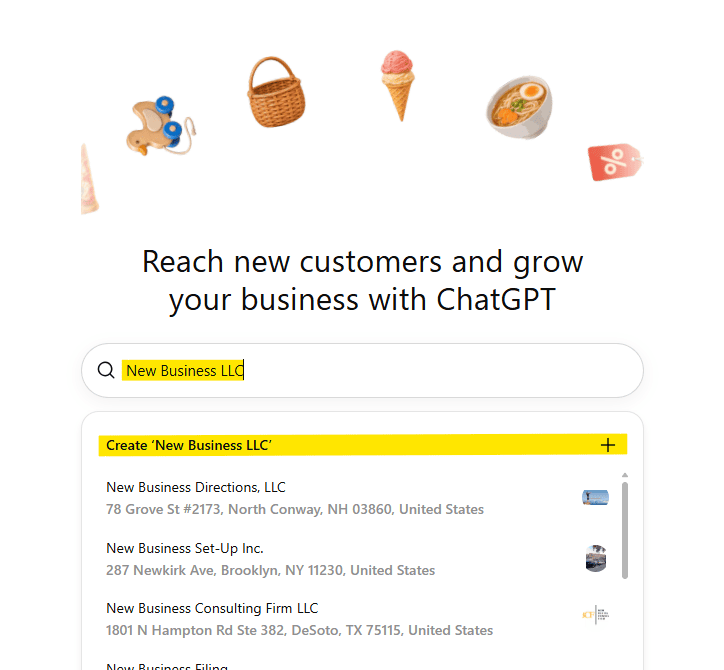
Type your business name in the search box. Odds are it’s already there. The results looked to me like they were pulled from Google My Business, so expect to see whatever name, address, and quirks your Google listing has.
4. Check the name. Then check it again.
This is the step that will trip people up, and it’s the one we can help with most.
Later in the process you’ll verify your identity and your business. The details you enter, like your legal business name, address, and EIN, need to match your official records. If you type “Smith Plumbing” and the IRS knows you as “Smith Mechanical Services LLC,” expect a snag.
Most owners don’t know their exact legal name down to the comma, and there’s no reason they should. Before you start, have something official handy, like your EIN letter or a recent tax return, so you can copy the details exactly.
5. Wrong name? Start fresh.
If the listing doesn’t match your legal entity name, or you’d rather build it clean, choose Create a new business and start from scratch. It takes a few extra minutes and saves you a failed verification later.
6. Prove you own the website
After you enter your website, you’ll be asked to add a single DNS record to your domain. It’s a TXT record, and it proves you control the site.
If “DNS record” made your eyes glaze over, forward the instructions to whoever manages your website. It’s a two minute job for them. One tip: DNS changes can take a little while to show up, so give it a few minutes before you hit verify.
7. Answer a few questions about what you do
Nothing tricky here. It wants to know what kind of business you are and what you offer.
8. Give it an email and a phone number
You’ll provide both, then verify by text or by call.
Heads up: it might not like a softphone number. If your office line runs through an internet phone app and the code never arrives, switch to a number from an actual carrier, like your cell.
9. The questions that assume you sell things in boxes
Once your phone and email are verified, the questions lean hard toward product businesses. Delivery policy. Refund policy. If you run a service business, you’ll feel a little like you wandered into the wrong meeting. Answer what applies and keep moving.
10. Welcome to your dashboard
From there you’re dropped into your business account, and this is where it gets interesting. You’ll see options to verify your identity, add products, and view mentions and website clicks.
Read that list again. Mentions. Clicks. Products. ChatGPT is getting serious about the ad game, and this dashboard is the front door.
What happens after you’re verified
Once your business is verified, it looks like you’ll be able to add products and get more insight into where your business shows up and how people are finding you. It’s early, and we expect it to look very different a year from now. We’ll keep an eye on it and tell you when something changes that matters to you.
Grab it now, figure it out later
You don’t need a plan for this platform yet. You just need to own your spot on it.
Think of it like buying your domain name back in the day. Nobody needed a master plan for the website. They needed to own the name before someone else did. Same idea here, even if the move is purely defensive.
The next steps are short:
- Block 20 minutes on your calendar this week.
- Confirm your exact legal business name, address, and EIN.
- Go to chatgpt.com/business-hub and claim your business.